— Application workflow

Your whole workflow — not just a generator.

CVVia ships with the supporting tools that turn scattered applications into a managed pipeline. Track, discover, store, follow up, remember.

Dashboard · Pipeline

Applied

4

Interview

2

Offer

1

Rejected

1

— What it does

The primary outputs (CV, cover letter, ATS score, interview prep) are only half the story. What makes a job search actually work is the workflow around them — and CVVia bakes it in.

Five tools, one dashboard. Apply, track, discover new roles, follow up, never miss an interview. No third-party trackers, no copy-paste into Notion.

  • Kanban pipeline with drag-and-drop status
  • Public job board with thousands of open roles
  • Unified file manager for every document you own or generate
  • Seven follow-up email types, drafted in your voice
  • Smart reminders for interviews, deadlines, and follow-up windows

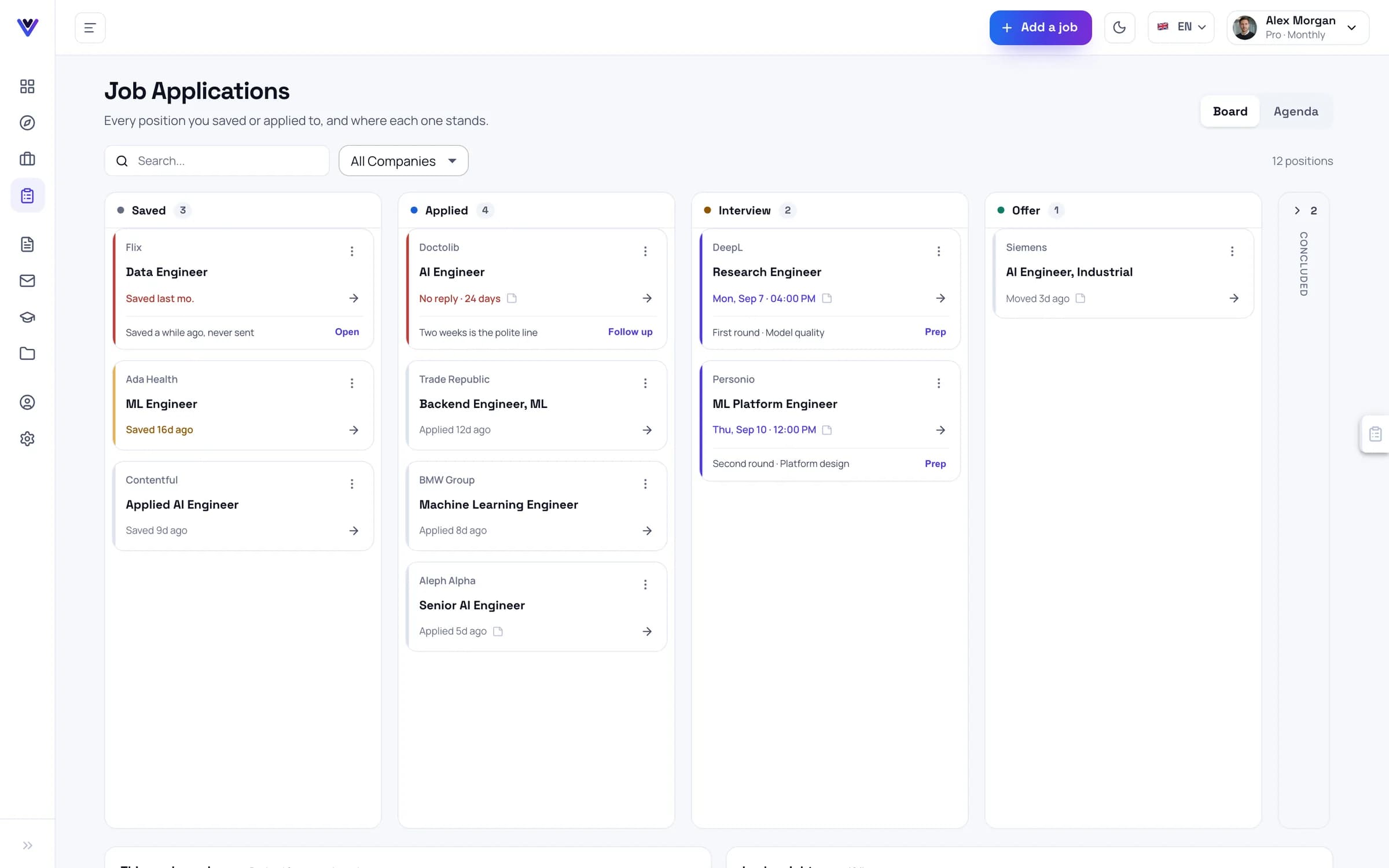
Application pipeline (Kanban)

A kanban board of every role you're pursuing — Applied, Interview, Offer, Rejected. Drag to update status; clicking a card opens the full application kit for that role (CV, cover letter, ATS score, interview prep). When status changes, reminders auto-adjust — a card moving to Interview triggers prep windows; an Offer card surfaces follow-up email templates.

Job discovery

Thousands of open roles aggregated inside CVVia (Arbeitnow today, more sources rolling out), filterable by location, company, and tech stack. 'Prepare kit' on any listing builds a tailored CV, cover letter, ATS score, and interview prep in one go — then drops the role into your kanban under Applied. No copy-paste, no tab juggling.

File manager

Every document you upload and every CV or cover letter CVVia generates — organised into folders you control. Search by company, role, or status; preview the PDF; export DOCX or JSON. Tied to the kanban: each board card shows the exact assets generated for that application, one click away.

Follow-up emails

Seven templates — thank-you, status check, polite nudge, offer accept, offer decline, interview confirm, withdrawal. Each draft pulls from your specific application context (the role, your CV, the company research). Reminders trigger them at the right moment, so you don't have to track the etiquette yourself.

Reminders

Upcoming interviews, application deadlines, follow-up windows — surfaced on your dashboard before you forget. Reads from your kanban: a card sitting in Applied for 7 days fires a polite nudge; a card in Interview triggers prep windows. Silent until something actually needs your attention.

— Who it's for

01

Power user tracking 20+ applications

Kanban keeps the chaos organised. Filter by stage, by date applied, by company. Never lose track of where you stand.

02

Career change deep search

Use Discover to browse roles outside your current lane. Save interesting ones, prepare kits in bulk, track responses over months.

03

Student graduation sprint

Apply to 40+ roles in a focused 4-week window. Reminders catch the follow-up moments that would otherwise slip through the cracks.

— Frequently asked

Application workflow

Your whole workflow — not just a generator.

Start free — no credit card